
A free retro board for agile teams
Retro Harbour is a free online retrospective board for software and agile teams. Create a board, share the link, run your sprint retro. Free forever, passwordless email access, and no trial that quietly expires after two weeks.
What you actually get in the free tier
Everything is in the free tier. There is no paid tier behind the next click and no "this requires the Pro plan" prompt halfway through a retro. The hosted version is run by the maintainer because the running cost is small, and a tool that needs procurement is a tool most teams will never try.
- Unlimited boards and participants - no seat counts, no board caps, no per-user pricing to track.
- Passwordless email verification - create a board, share the link, your team joins. Required email verification, no SSO to configure.
- Real-time collaboration - cards, votes, timers, and participants sync live.
- 11 built-in templates - 4Ls; Mad, Sad, Glad; Start, Stop, Continue; KALM; Went Well / To Improve; Sailboat; Starfish; Rose, Thorn, Bud; Lean Coffee; DAKI. All free, all customisable.
- Markdown export - one click downloads the entire retro (participants, cards, votes, actions) as a clean .md file for your wiki or issue tracker.
- No "upgrade to unlock" - the trial doesn't expire, the premium tier doesn't exist. You get the whole tool.
Looking for a "retro board"? Here's what this one is
The phrase "retro board" gets used for two very different things. To save anyone a wrong turn:
| Aspect | This page is about | Not this |
|---|---|---|
| Product | A digital retrospective board for software teams | Retro-styled tabletop or arcade hardware |
| Use | Run a sprint retrospective with a remote or in-office team | Play board games at home |
| Audience | Agile, scrum, and kanban teams | Hobbyists and tabletop collectors |
| Price | Free forever, passwordless email access, no credit card | Whatever the retailer charges |
Quick check: if your team has just finished a sprint and wants a shared board to write "what went well / what didn't / what to change," you're in the right place. If you're shopping for retro consoles, you're not.
How to start a free retro with verified email
- Open the board. Click "Start a free retro," pick a template (or start blank), name the retro. The board exists the moment you click create. Verified email required.
- Share one link. Copy the board URL into Slack, Teams, or the sprint invite. Participants verify their email to join. No invites to send, no permissions to grant.
- Write, group, vote. Your team writes cards privately, reveals them together, groups themes, and votes on what matters most. The board sorts by votes automatically.
- Export and act. Capture action items in the dedicated Actions column. Export the whole board as Markdown for your wiki, ticket tracker, or sprint notes.
A real-time retrospective board built for software teams
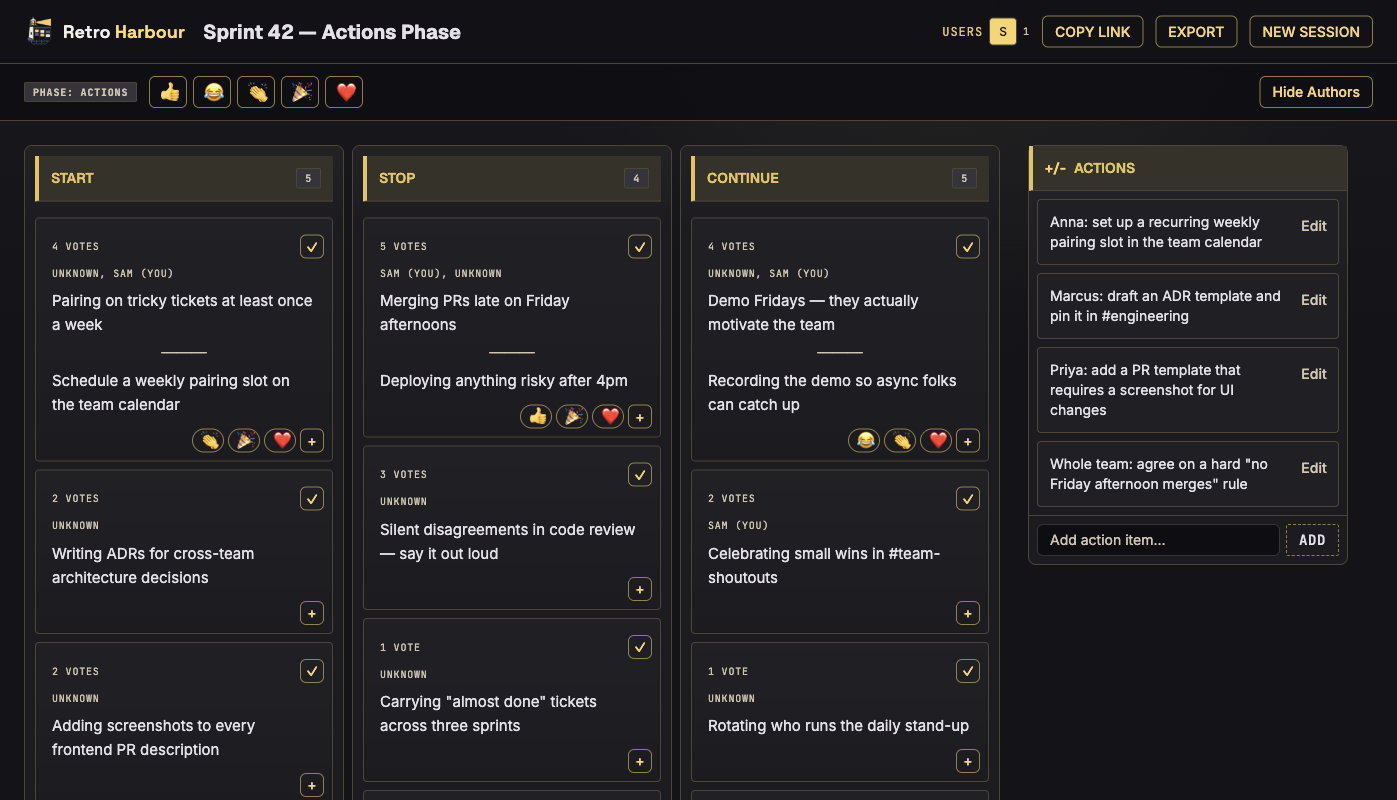
Below is the board in the final phase: voted cards on the left, owned action items on the right. Everyone sees the same board at the same time; the export captures all of it.
FAQ
Is it actually free?
Yes. Unlimited boards, unlimited participants, no credit card, no trial period. There is no paid tier to upgrade to.
Do I need to verify my email?
Yes. Creators and participants verify their email through a one-time link. No password or SSO setup is required.
Is this a board game site?
No. Retro Harbour is a free online retrospective board for software, agile, and scrum teams: the kind used in sprint retrospectives, not tabletop or arcade games.
What is the catch?
There isn't one. Retro Harbour is run by the maintainer for free because the running cost is small. Private email access, no upsell.
How does this compare to paid retro tools?
For running a 60-minute sprint retro with a remote team, the core flow is the same: write privately, reveal, group, vote, capture actions, export. Paid tools add Jira/Confluence integrations and enterprise SSO. If you don't need those, this is the faster and cheaper option. See also our free retrospective tools overview.
Preview a complete retro before you create a board
The board moves from masked writing to grouping, voting and Actions. Try this starter: Continue — pair on risky changes; Stop — handing untested tickets to QA late Friday; Start — agree test examples before implementation. Vote on one theme, then record an owner, deadline and success check.
Use Start, Stop, ContinueVerify your email first; then edit the columns before creating the board.